
Getting your systems integrated with Firetip takes less than five minutes. This step-by-step developer guide details how to configure domain-bridges, wire up dynamic campaign dispatches, and plug into the official Firetip SDKs.
Step 1: Authenticate the Core Client Interface
To communicate securely with your dedicated sc01 routing hardware, you must pass your verification token inside your authorization payload headers. This completely insulates your client communication matrix from outside networks.
$ch = curl_init("https://api.firetip.pro/v1/dispatch");
curl_setopt($ch, CURLOPT_RETURNTRANSFER, true);
curl_setopt($ch, CURLOPT_POST, true);
curl_setopt($ch, CURLOPT_HTTPHEADER, [
'Authorization: Bearer YOUR_SC01_NODE_SECRET_KEY',
'Content-Type: application/json'
]);
Tip: Rotate your SC01_NODE_SECRET_KEY on a fixed cadence and store it in a hardware-backed secret manager. The Firetip engine will gracefully accept key rollovers without interrupting in-flight dispatches.
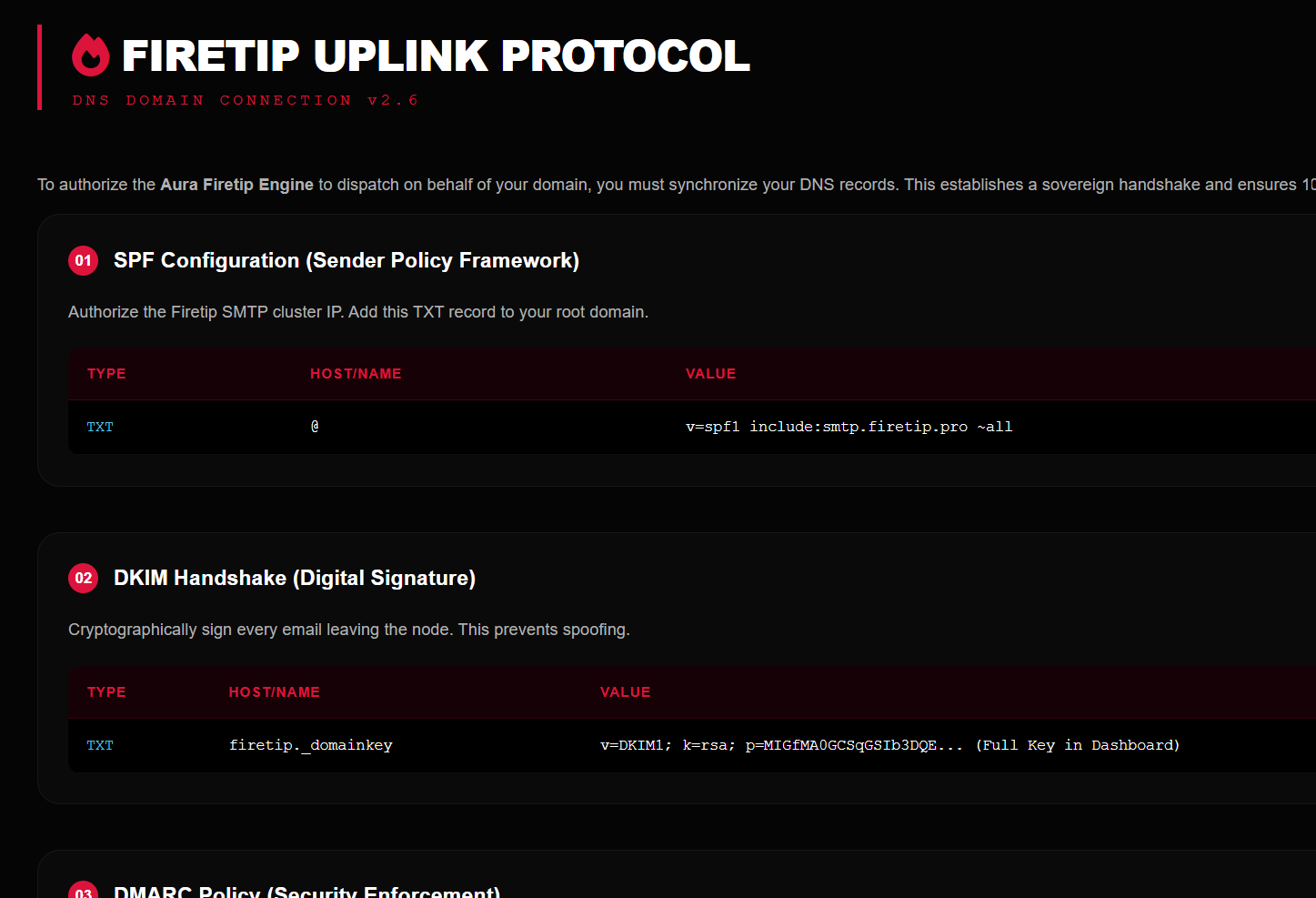
Step 2: Map Your Domain-Bridge Pass-Through
To preserve pristine white-label brand authority across your campaign runs, map your sender domain pointer using clean TXT handles. Firetip reads inbound opens via these dedicated, isolated tracking channels:
| TYPE | HOST / SUBDOMAIN | VALUE / TARGET DESTINATION | TTL |
|---|---|---|---|
| TXT | firetip-verification | v=ft1; node=sc01-cluster-alpha | 3600 |
| CNAME | click-track | bridge.firetip.pro | 14400 |
Once DNS has propagated, Firetip will automatically bind your bridge.firetip.pro channel to your tenant. You can safely use multiple bridge domains (for example, per brand or per environment) without cross-contamination of analytics.
Step 3: Construct and Fire Your Campaign Payload
Build your target compilation array and drop it straight into the outbound processing pipeline. Because Firetip uses high-velocity asynchronous loop processing, thousands of unique recipients can be safely handled within a single transactional execution block.
'campaign_id' => 'launch_campaign_2026',
'bridge_domain' => 'click-track.yourdomain.com',
'recipients' => [
['email' => 'user1@example.com', 'merge_tags' => ['name' => 'Alex']],
['email' => 'user2@example.com', 'merge_tags' => ['name' => 'Jordan']]
],
'html_body' => '<h1>Hello {{name}}</h1><p>Secure transaction executed.</p>'
];
curl_setopt($ch, CURLOPT_POSTFIELDS, json_encode($payload));
$response = json_decode(curl_exec($ch), true);
echo "Status: " . $response['status']; // Returns: "PROCESSING_DEQUEUED"
Your systems are now hooked into the system. Monitor your endpoint webhooks to process real-time status verifications as transactions are executed across the sc01 cluster.
Step 4: Wire Up Webhook Status Streams
Firetip never blocks your request thread while messages are in-flight. Instead, it emits signed webhook callbacks as each recipient transitions through the delivery lifecycle (QUEUED, SENT, OPENED, CLICKED, FAILED).
{
"event": "DELIVERY_STATUS",
"campaign_id": "launch_campaign_2026",
"recipient": "user1@example.com",
"status": "OPENED",
"timestamp": "2026-06-10T20:19:00Z",
"signature": "hex-signature-here"
}
Always verify the signature header against your Firetip webhook secret before mutating internal state. This ensures that only genuine sc01 cluster events can influence your analytics or billing logic.
Step 5: Use the Official Firetip SDKs
For most teams, the fastest path is to use the official SDKs instead of hand-rolling HTTP clients. Each SDK wraps authentication, retries, and error normalization around the same asynchronous dispatch core.
PHP SDK
require __DIR__ . '/vendor/autoload.php';
use Firetip\Client;
$client = new Client([
'api_key' => 'YOUR_SC01_NODE_SECRET_KEY',
]);
$response = $client->dispatch([
'campaign_id' => 'launch_campaign_2026',
'bridge_domain' => 'click-track.yourdomain.com',
'recipients' => [
['email' => 'user1@example.com', 'merge_tags' => ['name' => 'Alex']],
],
'html_body' => '<h1>Hello {{name}}</h1>',
]);
echo $response['status']; // PROCESSING_DEQUEUED
Node.js SDK
const { FiretipClient } = require("@firetip/node");
const client = new FiretipClient({
apiKey: "YOUR_SC01_NODE_SECRET_KEY",
});
async function run() {
const res = await client.dispatch({
campaign_id: "launch_campaign_2026",
bridge_domain: "click-track.yourdomain.com",
recipients: [
{ email: "user1@example.com", merge_tags: { name: "Alex" } },
],
html_body: "
Hello {{name}}
",});
console.log(res.status);
}
run();
Python SDK
from firetip import FiretipClient
client = FiretipClient(api_key="YOUR_SC01_NODE_SECRET_KEY")
res = client.dispatch({
"campaign_id": "launch_campaign_2026",
"bridge_domain": "click-track.yourdomain.com",
"recipients": [
{"email": "user1@example.com", "merge_tags": {"name": "Alex"}},
],
"html_body": "
Hello {{name}}
",})
print(res["status"]) # PROCESSING_DEQUEUED
All SDKs expose the same core primitives: dispatch for outbound campaigns, get_campaign for status inspection, and list_events for historical analytics. You can safely mix raw HTTP calls and SDK usage inside the same environment.
Step 6: Promote from Sandbox to Production
Start by wiring Firetip into a non-critical environment and replaying a subset of your existing campaigns. Once you are satisfied with delivery performance and webhook fidelity, flip your production DNS bridge to point at the sc01 cluster and retire your legacy dispatch stack.
From this point on, Firetip becomes your sovereign dispatch layer—your applications simply enqueue intent, and the asynchronous engine handles the rest.